From our worlds to yours

Creations

Small additions. New possibilities.

Discover original Minecraft Bedrock add-ons made by Volenger. From unusual creatures to useful gameplay improvements, find something new to bring into your world.

First add-on? Start with installation

The collection

Made to play.

Made for Minecraft Bedrock. Choose an add-on, check its requirements, and bring something new to your world.

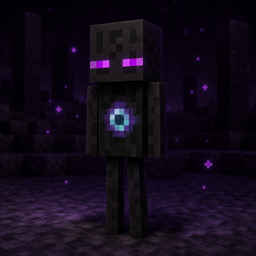
Enderboy, a dark creature with violet eyes and a glowing chest

A familiar kind of strange

Enderboy

v1.0.0

An enderman-like mob with its own look, teleporting habits, and a temper best left undisturbed.

Edition
Minecraft Bedrock
Minimum engine
1.21.60
Includes
Behavior + resource packs
  • Natural spawning in configured Overworld, Nether, and End biomes.
  • Teleportation, 40 health, and anger when provoked or stared at.
  • Use its spawn egg, or summon it directly: /summon volenger:enderboy
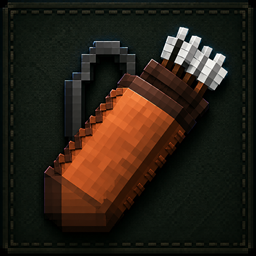
A leather quiver filled with arrows

Keep your next shot close

Quivers

v1.0.0

Bundle eight arrows into a leather quiver, unpack them when you need them, and keep your bow supplied on the move.

Edition
Minecraft Bedrock
Minimum engine
1.21.90
Includes
Behavior + resource packs
  • Craft with eight arrows surrounding one leather at a crafting table.
  • Unpack a quiver in your inventory to recover eight arrows and the leather.
  • In Survival, using a bow or crossbow with no loose arrows opens a quiver when inventory space allows.

Minimum engine versions come directly from the pack manifests.

Use a compatible Bedrock client or server; these add-ons do not support Java Edition.

Back up your world before adding or updating packs.

Make room in your world

Download. Import. Explore.

Each .mcaddon file brings the behavior and resource packs together. Import it once, then keep both packs enabled and update them together.

  1. Choose your add-on. Download the .mcaddon file for the add-on you want to try.
  2. Import into Minecraft. Open the file with Minecraft Bedrock and wait for both packs to finish importing.
  3. Activate both packs. In a new or backed-up world, enable the add-on under Behavior Packs and Resource Packs.
  4. For dedicated servers. Extract and install both packs using your server's usual pack workflow, then enable the matching versions.